Expenses in the Telegram bot
One message to @monnex_bot is one operation.
Quick entry in Monnex records an expense or income from one line of text, such as “Coffee 180”. The amount and the description can go in any order, and a leading plus marks income. Monnex picks the category from your history and saves the operation, which you can undo straight away.
Updated
How it works
The quick entry line sits on Home. You type what you would say out loud — what it was and how much — and press save. Monnex reads the amount, takes the rest as the description and chooses the category you used for similar entries before.
Coffee 180180 groceries+5000 salary-200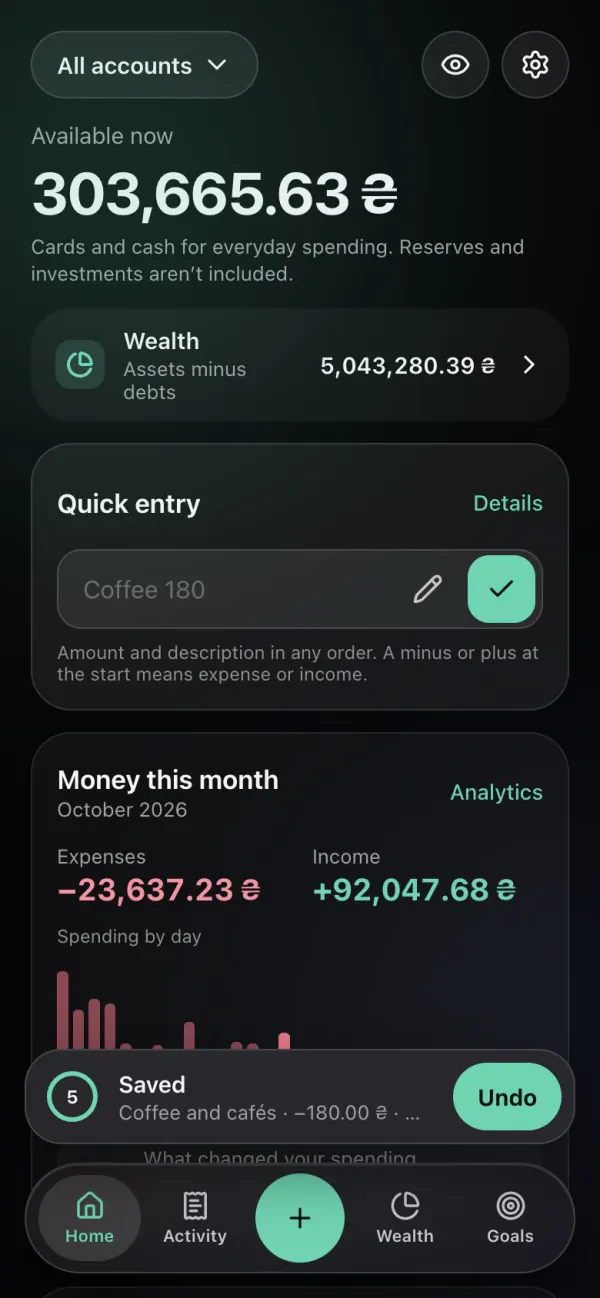
Step by step
In the Telegram Mini App or at app.monnex.app — the quick entry line is at the top.
“Coffee 180” or “180 coffee”; add a plus for income: “+5000 salary”.
The saved operation shows its category and account; one tap undoes it.
Facts
Questions
An amount and a few words about it, in any order: “Coffee 180”, “180 groceries”, “taxi 250”. A leading plus records income; a minus or no sign records an expense.
From your history: the category you used for similar descriptions before. You can change it by opening the saved operation.
Yes. Every quick entry can be undone in one tap right after it is saved, and you can edit or delete the operation later in Activity.
Both create the same operations. Quick entry is handy when the app is already open; a message to the bot is handy when you are in Telegram anyway.
Yes. Recording operations has no count limits on Free.
Related
One message to @monnex_bot is one operation.
See how much is left for today after each entry.
A guide to keeping track of spending without giving up.
Open Monnex in Telegram and type “Coffee 180”.